

Speed to lead is the elapsed time between a defined inbound action — a form submission, demo request, or live chat start — and the first meaningful human outreach attempt. The single most important recommendation: measure the right clocks, set SLAs by lead intent, remove manual routing, and add 24/7 coverage for high-intent flows.
The four levers that move the needle fastest:
- Instant routing — leads assigned to an owner the moment they arrive, no queue, no batch check
- Push notifications — SMS, Slack, or mobile alerts that reach reps in seconds, not hours
- Templated personalised replies — prebuilt messages that let reps respond in under two minutes without starting from scratch
- AI for after-hours — automated qualification and booking that captures intent when no human is available
Get these four right and you will compress response time faster than any amount of rep training or hiring.
Key takeaways
Responding to a lead within five minutes produces dramatically better qualification odds than waiting 30 minutes — and the fastest way to close that gap is fixing routing and after-hours coverage before retraining reps.
| Point | Details |
|---|---|
| Measure four clocks separately | Track received, assigned, first human attempt, and successful contact — SLAs belong on the first three. |
| Use medians, not averages | A single 72-hour outlier inflates your mean; median response time reflects the typical lead's experience. |
| Fix routing before retraining | Manual assignment is the most common bottleneck and the easiest to resolve with a routing rule. |
| Cover after-hours gaps | Wall-clock time includes nights and weekends; AI receptionists and chatbots compress clocks one and two around the clock. |
| Nexwin for 24/7 capture | Nexwin's AI receptionist and N-Chat capture, qualify, and route every call and web enquiry automatically, day or night. |
Table of Contents
- What does "speed to lead" actually measure?
- Why speed to lead affects your conversion rate
- How to measure speed to lead: KPIs, formulas, and reporting
- What are realistic benchmarks for lead response time?
- Practical steps to improve speed to lead, channel by channel
- Two-week implementation checklist for Australian SMBs
- How AI receptionists and chatbots capture every lead
- The honest priority order when you can't do everything at once
- Nexwin gives Australian businesses 24/7 lead coverage from day one
- Primary sources and further reading
- Sources
What does "speed to lead" actually measure?
Speed to lead is formally defined as the elapsed time between a defined inbound action and the first meaningful human outreach attempt. The word "meaningful" carries real weight here. An automated acknowledgement — the instant "Thanks, we'll be in touch!" email your CRM fires on form submit — does not count. Neither does a system notification to a rep who hasn't yet picked up the phone. The clock stops only when a human makes a genuine first contact attempt: a call, a personalised email, or a live chat reply.
Which events start the clock?
Common inbound events that should trigger the timer:
- Demo or trial request submitted
- Contact or enquiry form completed
- Pricing page enquiry sent
- Live chat initiated by a visitor
- Inbound phone call received during staffed hours
- Calendar booking request submitted
What does NOT start the clock: a content download with no sales intent signal, a newsletter subscription, or a support ticket from an existing customer. Lumping these into your lead pool skews averages and hides where real leakage is happening.
The four-clock model
The most useful measurement frame treats speed to lead as four separate clocks:
- Received → CRM commit — time from inbound action to the lead appearing in your system
- CRM commit → owner assigned — time from system entry to a named rep taking ownership
- Owner assigned → first human attempt — time from assignment to the rep's first genuine outreach
- First attempt → successful contact — time to an actual two-way conversation
SLAs belong on clocks one through three. Clock four depends on the prospect's availability, which is outside your control. Teams that SLA only on "successful contact" end up gaming the metric by counting voicemails as conversations.
Pro Tip: Start by instrumenting clock two (CRM commit → owner assigned). Manual assignment is the single most common bottleneck and the easiest to fix with a routing rule.
Why speed to lead affects your conversion rate
Lead interest decays fast. Classic research by Oldroyd and colleagues, published in the Harvard Business Review and widely cited since, found that contacting a lead within five minutes produced dramatically higher odds of qualifying that lead compared with waiting 30 minutes. The exact multiplier from that study (often cited as 21 times greater odds) comes from older, limited data, so treat it as a directional signal rather than a universal law. The underlying dynamic, however, is well-supported: intent peaks at the moment of action and decays quickly.
More recent analyses reinforce the direction. Lead response time is consistently identified as one of the highest-leverage metrics sales teams routinely underinvest in — improving response speed often lifts conversion without changing lead volume, ad spend, or messaging.
The hidden costs are easy to miss:
- Silent leakage — leads that never receive a first attempt don't show up as lost; they simply disappear from pipeline reports
- Skewed averages — a handful of very slow responses (weekend leads, after-hours enquiries) inflate your mean response time and mask how well the team performs during staffed hours
- Competitor capture — a prospect who submits a form to three vendors and hears from one within five minutes often stops responding to the others, regardless of product quality
The real cost of slow response isn't a lower close rate on the leads you do reach. It's the leads you never reach at all because someone else got there first.
How to measure speed to lead: KPIs, formulas, and reporting
Measuring speed to lead well requires more than pulling an average from your CRM. Here are the core KPIs to track:
- Clock 1 (Received → CRM commit): time from inbound action to system record creation
- Clock 2 (CRM commit → owner assigned): time from record creation to rep assignment
- Clock 3 (Owner assigned → first human attempt): time from assignment to first genuine outreach
- Clock 4 (First attempt → successful contact): time to two-way conversation (no SLA; track for context only)
- Wall-clock time: total elapsed time from the buyer's perspective, including nights and weekends
- Working-time: elapsed time within staffed hours only
Both wall-clock and working-time matter. A lead that arrives at 5:30 PM on a Friday might meet your working-time SLA of two hours when a rep calls Monday morning, yet the buyer has waited 64 hours. Reporting only working-time lets a team look compliant while buyers experience something very different.
The formula and why medians beat averages
Average response time = sum of all first-attempt times ÷ number of leads with a first attempt
The problem: one lead that sat for 72 hours pulls the average up sharply. Use the median instead — it reflects the experience of the typical lead rather than the worst outlier.
Denominator choices matter. Decide upfront whether you measure:
- All inbound leads (including content downloads with no sales intent)
- Only leads marked as sales-eligible
- Only leads where a first attempt was made (excludes no-attempts entirely)
Each choice produces a different number. The most honest denominator is all sales-eligible leads, including no-attempts. Excluding no-attempts makes the metric look better while hiding the leads most at risk.
Pro Tip: Run a no-attempt report weekly. Leads with zero outreach attempts are your most recoverable lost revenue — they haven't been lost to a competitor yet, just to inaction.
What are realistic benchmarks for lead response time?
Benchmarks vary significantly by industry, lead type, and company size. Geckoboard's analysis of lead response data shows telecommunications companies can achieve median response times around 16 minutes, while healthcare organisations often average several hours. Smaller companies frequently outperform large enterprises simply because there are fewer handoff steps.
| Lead type | Recommended SLA target | Notes |
|---|---|---|
| Live chat initiation | Under 1 minute | Visitor is active on-site; delay ends the session |
| Demo or trial request | Under 5 minutes | Highest intent; every minute counts |
| Pricing enquiry | A short response time target is recommended | Strong commercial intent |
| Contact sales form | Under 30 minutes | Moderate intent; personalise the reply |
| Content download | 2–4 hours | Lower intent; qualify before routing to sales |
Industry variation is real. A plumbing business fielding emergency calls operates differently from a B2B SaaS company handling enterprise demo requests. The right benchmark matches your lead intent and your competitive environment, not a global average.
After-hours and time zones in Australia
Australia's multiple time zones create a structural challenge. A lead submitted at 9 PM AEST from a Sydney prospect is already 11 PM in Perth — no staffed team covers both. Working-time SLAs look fine; wall-clock times are brutal. The practical fix is either after-hours AI coverage or a clear escalation rule that flags time-sensitive leads for first-thing-next-morning priority, with a personalised acknowledgement sent immediately.
Setting a five-minute SLA for demo requests is meaningless if 30% of your demo requests arrive outside staffed hours and receive no response until the following business day.
Practical steps to improve speed to lead, channel by channel
The fastest wins don't require new software. They require removing the manual steps that sit between a lead arriving and a rep knowing about it.
Start with the fastest wins
- Implement instant routing rules in your CRM so leads are assigned to an owner the moment they are created — no manual review queue, no daily batch assignment.
- Enable push notifications to reps via SMS, mobile app, or Slack the instant a high-intent lead is assigned. Email alone is too slow.
- Build three to five personalised reply templates for your most common lead types. A rep who can personalise and send in 90 seconds beats one who writes from scratch in 15 minutes.
- Set up a no-attempt alert that fires if a lead has had no outreach within your SLA window.
Channel guidance
Different channels suit different lead types and urgency levels:
- Phone: best for demo requests and pricing enquiries where intent is high and a conversation closes faster than an email chain. Target: call within five minutes.
- SMS: effective for appointment confirmations, follow-up nudges, and after-hours acknowledgements. Response rates are high; keep messages short and include a callback link.
- Live chat: the highest-urgency channel because the visitor is on your site right now. A response delay of more than 60 seconds typically ends the session.
- Personalised email: appropriate for content downloads and lower-intent forms where a thoughtful, relevant reply matters more than raw speed.
- Calendar booking link: send one in the first reply for demo requests. It removes a full back-and-forth exchange and compresses clock three to near zero.
Pro Tip: For inbound phone leads, the clock starts the moment the call is received — not when a rep calls back. If your team doesn't answer live, every unanswered call is a speed-to-lead failure, regardless of how fast the callback happens.
Automation and AI lead qualification
AI lead qualification can compress the manual qualification process from 15–30 minutes per lead to under 60 seconds by enriching, scoring, and routing leads automatically. That matters most when lead volume is high enough that reps are spending meaningful time deciding who to call first.
The caveat: automated qualification requires calibration. Route junk leads to sales and you burn rep time and trust. The right configuration qualifies by intent signal (page visited, form type, company size if available) rather than just contact completeness.
Process and people
Automation handles routing; people handle relationships. A dedicated inbound responder role — one rep whose primary job during peak hours is first contact on new leads — outperforms a shared-responsibility model where everyone is accountable and therefore no one is. Pair this with:
- Clear SLA targets per lead type, visible on a shared dashboard
- Escalation rules that flag breached SLAs to a manager automatically
- Weekly scorecards showing individual and team clock-three performance
- Incentive alignment: if reps are rewarded only on closed deals, speed to first contact gets deprioritised
The biggest speed-to-lead failures aren't technology problems. They're accountability gaps — no one owns the clock.
Two-week implementation checklist for Australian SMBs
This checklist is designed for small and medium businesses that want to reduce lead response time without a multi-month platform project.
Days 0–2: define and instrument
- List every inbound event that should start the speed-to-lead clock (forms, chat, phone, booking requests).
- Agree on SLA targets by lead type (use the benchmark table above as a starting point).
- Confirm timestamps are being captured in your CRM for each clock. If they aren't, fix this before anything else.
- Identify the denominator: which leads will be included in your measurement?
Days 3–7: configure routing and coverage
- Set up instant assignment rules in your CRM so no lead sits unassigned.
- Enable SMS or mobile push notifications to reps for high-intent leads.
- Build your first three reply templates (demo request, pricing enquiry, contact form).
- Decide on after-hours coverage: AI receptionist, outsourced answering, or a clear next-morning escalation rule.
- If you use live chat, set a maximum response time of 60 seconds and assign a dedicated monitor during business hours.
Days 8–12: train, test, and measure
- Brief reps on SLA targets and show them the dashboard where their clock-three times will appear.
- Set escalation rules: if a lead breaches SLA, who gets notified and how?
- Run a test batch: submit five leads through each inbound channel and measure actual clock times end to end.
- Review no-attempt leads from the previous week and identify the cause (routing failure, rep inaction, or system gap).
Days 13–14: tune and hand off
- Analyse which lead types are consistently breaching SLA and adjust routing or staffing accordingly.
- Tighten qualification filters if junk leads are consuming rep time.
- Publish a live dashboard showing median clock-three time by lead type, visible to the whole team.
- Hand ongoing monitoring to operations with a weekly review cadence.
Pro Tip: Don't wait until day 14 to look at your data. Check clock times on day four — early visibility catches routing failures before they compound.
How AI receptionists and chatbots capture every lead
The structural problem with speed to lead for most Australian service businesses is not rep performance during business hours. It's the gap between when leads arrive and when humans are available. Phone calls at 7 PM, website enquiries on Sunday morning, form submissions during a busy on-site job — these are the leads that fall through.

AI receptionists and website chatbots address this by compressing clocks one and two to near zero, around the clock.
What Nexwin does for each clock
Nexwin's AI phone receptionist answers every inbound call in a natural Australian voice, captures structured customer details, and books appointments directly into your calendar. That collapses clock one (received → CRM commit) and clock two (CRM commit → owner assigned) into a single automated step, with no human required until clock three.
Specific capabilities that directly affect response time:
- 24/7 call answering — no call goes to voicemail during or outside business hours
- Caller memory — returning callers are recognised, reducing time spent on re-qualification
- Structured message capture — name, contact details, job type, and urgency level are recorded and pushed to the business immediately
- Smart call routing — calls are directed to the right person or team based on rules you set
- Warm transfer — when a human needs to take over, the AI hands off with context rather than making the caller repeat themselves
- Mobile app notifications — reps receive instant alerts with call details so clock three can start within minutes
N-Chat, Nexwin's website chatbot, covers the web channel with the same logic: a visitor who starts a chat at 10 PM gets an immediate, structured response rather than a "we'll be in touch" placeholder. Pairing N-Chat with the AI receptionist means both phone and web demand are captured, qualified, and routed without a human needing to be present.
Setup checklist
- Connect your calendar to Nexwin so the AI can book appointments in real time.
- Set booking rules: which job types can be booked automatically, which require human confirmation?
- Enable N-Chat on your website and configure the qualification questions that match your lead types.
- Set notification channels: which reps receive alerts, via what method, and for which lead types?
- Review the first week of call transcripts and booking data to tune routing rules.
The goal isn't to replace human contact. It's to make sure every lead is captured and structured before a human picks it up, so clock three starts with context rather than a cold call.
Nexwin's CRM integrations push captured data directly into your existing tools, so timestamps are recorded automatically and your four-clock reporting stays accurate without manual data entry.
The honest priority order when you can't do everything at once
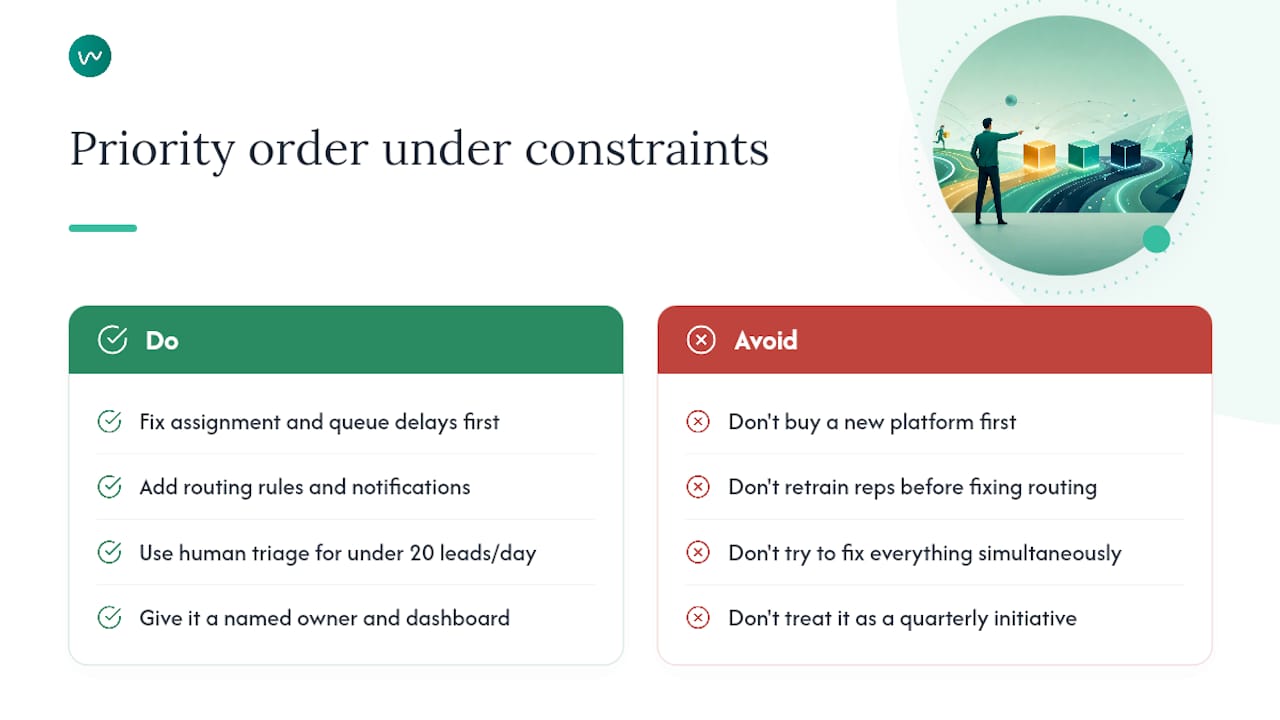
Most sales and marketing teams reading this have a real constraint: limited time, limited budget, and a list of competing priorities. The instinct is often to reach for the most visible fix — a new CRM, a chatbot, a rep training programme. That instinct is usually wrong.
Fix clocks one and two before you touch anything else. Manual assignment and queue delays are responsible for the majority of speed-to-lead failures, and they are almost always fixable with a routing rule and a notification, not a platform change. Expensive rep retraining has almost no effect if leads are sitting unassigned for two hours before a rep even knows they exist.
When lead volume is low — say, fewer than 20 inbound leads per day — a dedicated human triage role beats premature automation. One person whose job is to receive, qualify, and route every inbound lead within five minutes will outperform a half-configured chatbot every time. Automation earns its keep when volume scales past what a single person can handle without dropping balls.
Pick one channel to fix first. If most of your high-intent leads come through inbound phone, tighten that channel completely before touching live chat or email. Measurable improvement on one channel builds the internal case for investment in the next. Trying to fix everything simultaneously usually means fixing nothing properly.
The teams that improve fastest are the ones that treat speed to lead as an operational metric with a named owner, a visible dashboard, and a weekly review — not a quarterly initiative. The technology is secondary. The accountability structure is what actually moves the number.
Nexwin gives Australian businesses 24/7 lead coverage from day one
Missing a call after hours isn't a minor inconvenience. For a tradie, a clinic, or a real estate agent, it's often a booking that goes to the next name on the prospect's list. Nexwin is built specifically for Australian service businesses that need continuous lead capture without hiring a full-time receptionist.
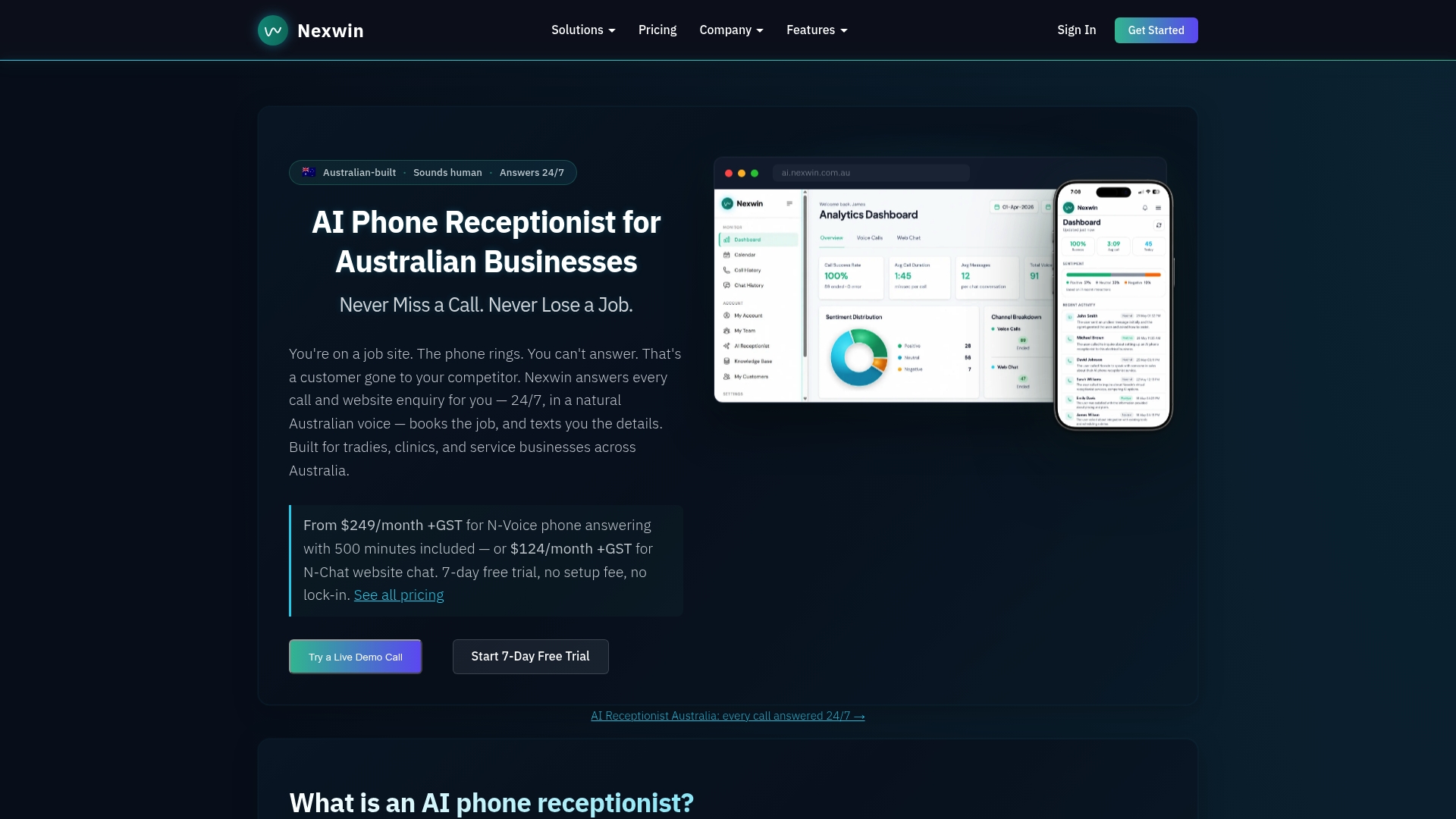
Two capabilities matter most for speed to lead: the AI phone receptionist answers every call in a natural Australian voice, captures structured details, and books appointments directly into your calendar — compressing clocks one and two to near zero. N-Chat handles the same job on your website, so after-hours web enquiries are captured and routed rather than lost. Both work together, around the clock, with no setup fee and no lock-in contract. Start a free trial at Nexwin and see your first-call capture rate within a week.
Primary sources and further reading
- The short life of online sales leads — Harvard Business Review; Oldroyd et al. on lead contact timing and qualification odds
- Speed to Lead: Definition, Why It Matters & How to Improve It — Outsales; definition, bottleneck analysis, and improvement tactics
- Speed to Lead: The B2B Guide to Faster Lead Response — Ivris Tech; four-clock model, SLA guidance, and wall-clock vs working-time distinction
- Lead Response Time: Benchmarks, Impact on Conversion & How to Improve — MetricGen; conversion impact framing and operational improvement tactics
- Lead Response Time KPI Examples — Geckoboard; industry and company-size benchmark snapshots
- Automated Lead Qualification — ZoomInfo Pipeline; AI qualification speed and routing benefits
- About Nexwin — Nexwin; AI receptionist capabilities for Australian service businesses
- N-Chat — AI Chatbot for Your Website — Nexwin; website chatbot for after-hours web lead capture
- Smart Appointment Scheduling — Nexwin; real-time calendar booking automation
Sources
- The short life of online sales leads
- Speed to Lead: Definition, Why It Matters & How to Improve It | Outsales
- Speed to Lead: The B2B Guide to Faster Lead Response
- Lead Response Time: Benchmarks, Impact on Conversion & How to Improve | MetricGen
- Lead Response Time | KPI examples | Geckoboard
- automated-lead-qualification